Consent API (beta)
Read and revoke FDX consent grants programmatically
Overview
Use the Consent API to build a consumer-facing consent portal, to answer support requests about a customer's connections, and to revoke access when a customer withdraws consent.
The Consent API represents each of your customers' authorizations as an FDX consent grant: a record of which application has access, which of the customer's resources it can read, which data clusters are in scope, and how long that access lasts.
The Consent API is currently in beta. To request access, contact Plaid solutions engineering. Note that the no-code Dashboard does not currently support the Consent API; if using both surfaces, you may see inconsistent data across the two.
For conceptual background on authorization records, or to learn how to manage consent via the Dashboard instead of via API, see Consent management.
Customer identifiers
Every consent grant is scoped to a customerId, which must be the same persistent, unique identifier you use as the sub claim in your OIDC ID token. See Unique user identifier (consistency key).
If you are a platform or gateway serving multiple institutions, Plaid assumes customerId is unique across all of them. If you reuse a customer identifier across institutions, contact your Plaid solutions engineering team before you integrate.
Data clusters
A consent grant covers a set of resources, each with a list of FDX data clusters. resources is omitted entirely when a grant covers none. resourceType is always ACCOUNT, and the clusters Plaid may request are:
| Data cluster | Includes |
|---|---|
ACCOUNT_BASIC | Account name, type, and masked account number |
ACCOUNT_DETAILED | Everything in ACCOUNT_BASIC, plus credit limits, due dates, and interest rates |
BALANCES | Current and available balances |
PAYMENT_SUPPORT | Account and routing numbers and other stored payment methods |
SCHEDULED_PAYMENTS | Future-dated single and recurring payments, with amounts and frequency |
TRANSACTIONS | Transaction amounts, dates, descriptions, and merchants |
STATEMENTS | PDF statements |
INVESTMENTS | Investment holdings, securities details, quantities, and market values |
CUSTOMER_CONTACT | Account owner name, email, phone, and postal address |
Plaid uses a different, consumer-facing taxonomy for these clusters in the Link flow. Contact your Plaid solutions engineering team if you need the mapping between the two.
Plaid does not use the BILLS, CUSTOMER_PERSONAL, IMAGES, and REWARDS clusters, so they will not appear on a consent grant Plaid brokers. The FDXDataCluster enum also defines ACCOUNT_PAYMENTS and NOTIFICATIONS.
Revocation and ecosystem sync
If you offer users the ability to revoke access to connected apps (for example, via a consumer-facing consent portal), you must keep the ecosystem in sync. When a user revokes access on your side, Plaid and the downstream app need to know immediately.
How it works:
- User revokes access on your domain: User visits your consent portal and disconnects an app
- Call
PUT /fdx/consents/{consentId}/revocation: Your system calls Plaid's revocation endpoint - Plaid notifies the app: Plaid sends a webhook to the disconnected app
- Plaid severs the connection: Plaid blocks the app from accessing data
- App stops requesting data: The app knows the user revoked access and stops making requests
This keeps revocation instant across all parties. Without it, the app won't know that consent has been revoked until the next time it attempts to actively fetch data from the connection.
Plaid notifies you of these events in real time via webhooks; see Webhooks below.
Webhooks
Plaid can optionally send webhooks to you when authorization events occur. Single-institution accounts can configure these in the Data Partner Dashboard via the Webhooks page. Platform accounts should reach out to your Plaid contact to have these enabled.
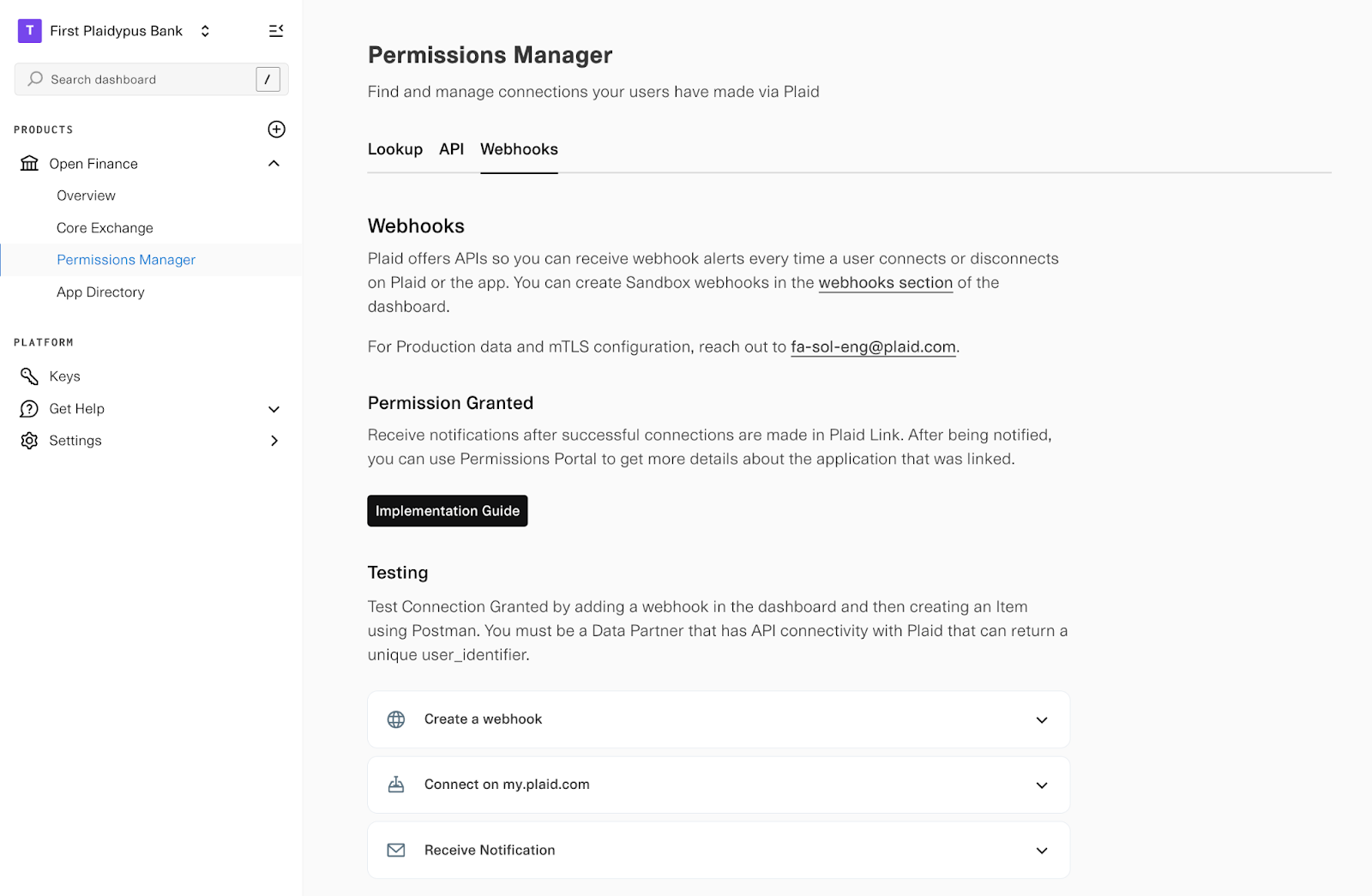
Plaid sends two webhooks: CONSENT_GRANTED and CONSENT_REVOKED.
Each webhook is an FDX event notification: a category/type pair identifies the event, and notificationPayload.customFields carries the details as name/value pairs.
CONSENT_GRANTED
Notifies you every time a user connects a new app via Plaid. While your system will already know about new OAuth authorizations, this webhook also alerts you to connections created via the returning user experience, where the user doesn't go through your OAuth flow and this webhook is your only real-time signal that a new connection was created.
When it fires: After a user successfully authorizes a new app.
Payload includes: The customer (user_identifier) and app details (application_id, application_name).
Partners that were already receiving this webhook before August 2026 still receive it under its earlier names, category AUTHORIZATION and type AUTHORIZATION_GRANTED.
What to do: Record the new connection. The webhook identifies the user and the app, but not the accounts or data clusters they authorized, so treat it as a signal to fetch the full consent grant from GET /fdx/consents rather than as the authorization record itself. If you offer a consent portal, display this new connection so users can view and manage it.
{
  "notificationId": "b3f1c4d2-8a5e-4b6a-9c1f-2e7d5a8b3c9d",
  "sentOn": "2026-08-05T14:32:00Z",
  "category": "CONSENT",
  "type": "CONSENT_GRANTED",
  "publisher": { "name": "Plaid", "type": "DATA_ACCESS_PLATFORM" },
  "notificationPayload": {
    "id": "consentapi-example-1",
    "idType": "CONSENT",
    "customFields": [
      { "name": "user_identifier", "value": "consentapi-example-1" },
      { "name": "application_id", "value": "36b78a27-ebbb-417b-a7b7-351734d2f8bd" },
      { "name": "application_name", "value": "Incremental Investing" }
    ]
  }
}
CONSENT_REVOKED
Notifies you when a user revokes access to an app, either through the third-party app itself or via my.plaid.com (Plaid Portal). If you offer a consent portal, you need this webhook to catch the revocations that happen elsewhere; otherwise your portal will drift out of sync when users disconnect through my.plaid.com or the app itself instead of through you.
When it fires: After a user or app revokes authorization.
Payload includes: The customer (user_identifier), app details, and who initiated the revocation (initiator: DATA_ACCESS_PLATFORM, INDIVIDUAL, or DATA_RECIPIENT).
What to do: Update your authorization records to mark the connection as revoked. If you offer a consent portal, update the display to show that the connection is no longer active.
{
  "notificationId": "e7a2d9f1-3b6c-4a8e-9d5f-1c8b4e2a7d3f",
  "sentOn": "2026-08-05T14:35:00Z",
  "category": "CONSENT",
  "type": "CONSENT_REVOKED",
  "publisher": { "name": "Plaid", "type": "DATA_ACCESS_PLATFORM" },
  "notificationPayload": {
    "id": "consentapi-example-1",
    "idType": "CONSENT",
    "customFields": [
      { "name": "user_identifier", "value": "consentapi-example-1" },
      { "name": "application_id", "value": "36b78a27-ebbb-417b-a7b7-351734d2f8bd" },
      { "name": "application_name", "value": "Incremental Investing" },
      { "name": "initiator", "value": "INDIVIDUAL" }
    ]
  }
}
Best practices
- Implement the
CONSENT_REVOKEDwebhook if you offer a consent portal - Use
PUT /fdx/consents/{consentId}/revocationto keep the ecosystem in sync during revocations - Set refresh token expiration to 13+ months (allows buffer for reauthorization)
- Direct users to my.plaid.com for self-service connection management
Authentication
Find your client_id and secret on the Keys page of the Data Partner Dashboard and include both as the PLAID-CLIENT-ID and PLAID-SECRET headers, or as client_id and secret in the request body. All requests must be made over HTTPS.
Endpoints
| Endpoint | Functionality |
|---|---|
GET /fdx/consents | List a customer's consent grants |
GET /fdx/consents/{consentId} | Get a single consent grant |
PUT /fdx/consents/{consentId}/revocation | Revoke a consent grant |
GET /fdx/consents/{consentId}/revocation | Get a consent grant's revocation history |
List a customer's consent grants
GET /fdx/consents
Fetch this list each time a customer opens your consent portal rather than serving a cached copy, so that revocations made elsewhere in the ecosystem are reflected immediately. Omit status to return grants in every state, which is useful for an audit view.
List FDX consent grants for a customer
Returns zero or more consent grants associated with the given data provider customer, optionally filtered by status.
Request fields
Data provider customer identifier whose consent grants to return.
queryOptional filter restricting results to a single consent grant status. One of ACTIVE, REVOKED, EXPIRED.
ACTIVE, REVOKED, EXPIRED querycurl -X GET 'https://production.plaid.com/fdx/consents?customerId=<customer_id>&status=ACTIVE' \
-H 'PLAID-CLIENT-ID: <client_id>' \
-H 'PLAID-SECRET: <secret>'Response fields
Consent grants matching the customerId (and optional status) filter.
The persistent identifier of the consent grant
Current status of a consent grant. One of ACTIVE, REVOKED, EXPIRED.
ACTIVE, REVOKED, EXPIREDWhen the consent was initially granted
date-time When the consent grant was last updated
date-time When the consent grant will expire. Omitted when the grant has no expiration.
date-time Non-end-user parties participating in the consent grant (Data Recipient, Data Provider, Data Access Platform).
Human recognizable common name
Identifies the type of a party
DATA_ACCESS_PLATFORM, DATA_PROVIDER, DATA_RECIPIENT, INDIVIDUAL, MERCHANT, VENDORURI for party, where an end user could learn more about the company or application involved in the data sharing chain
uri URI for a logo asset to be displayed to the end user
uri The registry containing the party's registration with name and id
FDX, GLEIF, ICANN, PRIVATERegistered name of party
Registered id of party
Permissioned resource entries. Omitted when there are no resources.
Type of resource permissioned on a consent grant.
ACCOUNT, CUSTOMER, DOCUMENTIdentifier of the resource permissioned.
Names of clusters of data elements permissioned.
ACCOUNT_BASIC, ACCOUNT_DETAILED, ACCOUNT_PAYMENTS, BILLS, CUSTOMER_CONTACT, CUSTOMER_PERSONAL, IMAGES, INVESTMENTS, NOTIFICATIONS, PAYMENT_SUPPORT, REWARDS, STATEMENTS, TAX, TRANSACTIONS, BALANCES, SCHEDULED_PAYMENTS{
"consent_grants": [
{
"id": "9585694d-3ae5-8863-1234-567890abcdef",
"status": "ACTIVE",
"createdTime": "2026-01-01T00:00:00Z",
"updatedTime": "2026-01-01T00:00:00Z",
"parties": [
{
"name": "My Example Client",
"type": "DATA_RECIPIENT",
"homeUri": "https://example.com",
"registry": "PRIVATE",
"registeredEntityName": "My Example Client LLC",
"registeredEntityId": "549300A0B1C2D3E4F5G6"
},
{
"name": "First Platypus Bank",
"type": "DATA_PROVIDER",
"homeUri": "https://www.platypus.com"
},
{
"name": "Plaid",
"type": "DATA_ACCESS_PLATFORM",
"homeUri": "https://plaid.com"
}
],
"resources": [
{
"resourceType": "ACCOUNT",
"resourceId": "b14e1e714693bc00",
"dataClusters": [
"ACCOUNT_BASIC",
"ACCOUNT_DETAILED",
"STATEMENTS"
]
}
]
},
{
"id": "1a2b3c4d-5e6f-7890-abcd-ef0123456789",
"status": "REVOKED",
"createdTime": "2026-01-03T00:00:00Z",
"updatedTime": "2026-01-04T00:00:00Z",
"parties": [
{
"name": "Another Example Client",
"type": "DATA_RECIPIENT",
"homeUri": "https://another-example.com",
"registry": "PRIVATE",
"registeredEntityName": "Another Example Client LLC",
"registeredEntityId": "549300Z9Y8X7W6V5U4T3"
},
{
"name": "First Platypus Bank",
"type": "DATA_PROVIDER",
"homeUri": "https://www.platypus.com"
},
{
"name": "Plaid",
"type": "DATA_ACCESS_PLATFORM",
"homeUri": "https://plaid.com"
}
],
"resources": [
{
"resourceType": "ACCOUNT",
"resourceId": "c25f2f825704cd11",
"dataClusters": [
"ACCOUNT_BASIC",
"ACCOUNT_DETAILED"
]
}
]
}
]
}Get a single consent grant
GET /fdx/consents/{consentId}
Use the parties array to identify the application: the entry with type of DATA_RECIPIENT is the connected app, DATA_PROVIDER is you, and DATA_ACCESS_PLATFORM is Plaid.
If you have an existing live integration and need the consentId values for connections that predate it, contact your Plaid solutions engineering team to coordinate a backfill.
Get FDX consent grant
Returns a consent grant by its identifier.
Request fields
Unique identifier of the consent grant.
pathcurl -X GET 'https://production.plaid.com/fdx/consents/<consent_id>' \
-H 'PLAID-CLIENT-ID: <client_id>' \
-H 'PLAID-SECRET: <secret>'Response fields
The persistent identifier of the consent grant
Current status of a consent grant. One of ACTIVE, REVOKED, EXPIRED.
ACTIVE, REVOKED, EXPIREDWhen the consent was initially granted
date-time When the consent grant was last updated
date-time When the consent grant will expire. Omitted when the grant has no expiration.
date-time Non-end-user parties participating in the consent grant (Data Recipient, Data Provider, Data Access Platform).
Human recognizable common name
Identifies the type of a party
DATA_ACCESS_PLATFORM, DATA_PROVIDER, DATA_RECIPIENT, INDIVIDUAL, MERCHANT, VENDORURI for party, where an end user could learn more about the company or application involved in the data sharing chain
uri URI for a logo asset to be displayed to the end user
uri The registry containing the party's registration with name and id
FDX, GLEIF, ICANN, PRIVATERegistered name of party
Registered id of party
Permissioned resource entries. Omitted when there are no resources.
Type of resource permissioned on a consent grant.
ACCOUNT, CUSTOMER, DOCUMENTIdentifier of the resource permissioned.
Names of clusters of data elements permissioned.
ACCOUNT_BASIC, ACCOUNT_DETAILED, ACCOUNT_PAYMENTS, BILLS, CUSTOMER_CONTACT, CUSTOMER_PERSONAL, IMAGES, INVESTMENTS, NOTIFICATIONS, PAYMENT_SUPPORT, REWARDS, STATEMENTS, TAX, TRANSACTIONS, BALANCES, SCHEDULED_PAYMENTS{
"id": "9585694d-3ae5-8863-1234-567890abcdef",
"status": "ACTIVE",
"createdTime": "2026-01-01T00:00:00Z",
"updatedTime": "2026-01-01T00:00:00Z",
"parties": [
{
"name": "My Example Client",
"type": "DATA_RECIPIENT",
"homeUri": "https://example.com",
"registry": "PRIVATE",
"registeredEntityName": "My Example Client LLC",
"registeredEntityId": "549300A0B1C2D3E4F5G6"
},
{
"name": "First Platypus Bank",
"type": "DATA_PROVIDER",
"homeUri": "https://www.platypus.com"
},
{
"name": "Plaid",
"type": "DATA_ACCESS_PLATFORM",
"homeUri": "https://plaid.com"
}
],
"resources": [
{
"resourceType": "ACCOUNT",
"resourceId": "b14e1e714693bc00",
"dataClusters": [
"ACCOUNT_BASIC",
"BALANCES",
"TRANSACTIONS",
"SCHEDULED_PAYMENTS"
]
}
]
}Revoke a consent grant
PUT /fdx/consents/{consentId}/revocation
Call this endpoint as soon as a customer disconnects an application in your portal, or when your own risk or compliance systems terminate access. Plaid then notifies the application and stops serving it data, which is what keeps your portal, Plaid, and the application in sync. See Revocation and ecosystem sync for what happens if you skip this call.
Set initiator to the party that triggered the revocation, usually DATA_PROVIDER. Set reason to USER_ACTION when a customer disconnects the app themselves, or BUSINESS_RULE when you revoke on your own initiative.
A successful revocation returns 204 No Content with an empty body. Revocation is not idempotent: a grant that is already revoked or expired returns 409 CONFLICT rather than succeeding again. Revocation is also per grant, so a customer with several grants for the same application needs a call for each consentId.
Revoke FDX consent grant
Revokes a consent grant, ending the data recipient's ongoing access to the customer's data.
Request fields
Unique identifier of the consent grant.
pathIdentifies the type of a party
DATA_ACCESS_PLATFORM, DATA_PROVIDER, DATA_RECIPIENT, INDIVIDUAL, MERCHANT, VENDORReason for lifecycle event status change
BUSINESS_RULE, SECURITY_EVENT, USER_ACTION, OTHERAdditional information or description of an OTHER reason
When the revocation was effected on the initiator's side
date-time curl -X PUT 'https://production.plaid.com/fdx/consents/<consent_id>/revocation' \
-H 'PLAID-CLIENT-ID: <client_id>' \
-H 'PLAID-SECRET: <secret>' \
-H 'Content-Type: application/json' \
-d '{
"initiator": "DATA_PROVIDER",
"reason": "USER_ACTION"
}'Revoking a consent grant stops the application from requesting new data. It does not delete data the application has already received; a customer who wants that data deleted has to ask the application directly.
Retrieve a consent grant's revocation history
GET /fdx/consents/{consentId}/revocation
Use this endpoint to show a customer when and why access ended, and to keep an audit record of who initiated it. Records are returned most recent first, and the array is empty for a grant that has never been revoked.
Retrieve FDX consent grant revocation records
Returns the revocation history of a consent grant.
Request fields
Unique identifier of the consent grant.
pathcurl -X GET 'https://production.plaid.com/fdx/consents/<consent_id>/revocation' \
-H 'PLAID-CLIENT-ID: <client_id>' \
-H 'PLAID-SECRET: <secret>'Response fields
Revocation records for the consent grant, most recent first. Empty when the grant has never been revoked.
Current status of a consent grant. One of ACTIVE, REVOKED, EXPIRED.
ACTIVE, REVOKED, EXPIREDReason for lifecycle event status change
BUSINESS_RULE, SECURITY_EVENT, USER_ACTION, OTHERIdentifies the type of a party
DATA_ACCESS_PLATFORM, DATA_PROVIDER, DATA_RECIPIENT, INDIVIDUAL, MERCHANT, VENDORWhen the consent grant was revoked
date-time {
"revocations": [
{
"status": "REVOKED",
"reason": "USER_ACTION",
"initiator": "DATA_PROVIDER",
"updatedTime": "2026-01-03T00:00:00Z"
}
]
}Testing in Sandbox
A consent grant is normally created when a customer authorizes an application through your OAuth flow. To exercise these endpoints in Sandbox without a live connection, seed a grant with /sandbox/fdx/consent/seed and then list, retrieve, and revoke it as you would in production.
Pass consent_id to control the identifier of the seeded grant, which makes tests deterministic; omit it and Plaid generates one. Seeding fails if a grant with that identifier already exists.
Revoking a consent grant is permanent. To test reconnection, seed a second grant for the same customer_id and application_id; it is issued a new consent_id, and the original stays in the customer's history as REVOKED.
POST /sandbox/fdx/consent/seed
Seed an FDX consent grant for a sandbox data partner
/sandbox/fdx/consent/seed creates a test FDX consent grant (and a backing Item) for a data provider's customer in Sandbox, so the FDX Consent API endpoints can be exercised end-to-end without a live data provider connection.
customer_id is the data provider's identifier for the end user and application_id identifies the data recipient application the consent is granted to; both are required. Optionally provide consent_id (a UUIDv4) to control the seeded grant's identifier; one is generated when omitted. The seeded grant is returned by /fdx/consents and /fdx/consents/{consentId}, and can be revoked via /fdx/consents/{consentId}/revocation.
Request fields
Your Plaid API client_id. The client_id is required and may be provided either in the PLAID-CLIENT-ID header or as part of a request body.
Your Plaid API secret. The secret is required and may be provided either in the PLAID-SECRET header or as part of a request body.
The data provider's identifier for the end user to associate the seeded consent grant with.
This field will map to the application ID that is returned from /item/application/list, or provided to the institution in an oauth redirect.
Optional UUIDv4 identifier for the seeded consent grant. If omitted, one is generated. Seeding fails if a grant with this identifier already exists.
curl -X POST 'https://sandbox.plaid.com/sandbox/fdx/consent/seed' \
  -H 'Content-Type: application/json' \
  -d '{
    "client_id": "<client_id>",
    "secret": "<secret>",
    "customer_id": "consentapi-example-1",
    "application_id": "3f952a96-b6f9-4f09-a1f7-1a474cb128f6"
}'Response fields
The identifier of the newly seeded FDX consent grant.
A unique identifier for the request, which can be used for troubleshooting. This identifier, like all Plaid identifiers, is case sensitive.
{
  "consent_id": "9cfe04b5-6d04-45ce-897e-45f2580bf013",
  "request_id": "m8MDnv9okwxFNBV"
}
Plaid provides demo applications to grant consent to when seeding:
| Demo application | application_id |
|---|---|
| Budget Works | c048eab9-a70a-42fe-94e9-35980d0a965c |
| Incremental Investing | 36b78a27-ebbb-417b-a7b7-351734d2f8bd |
| My Peer Payer | 3f952a96-b6f9-4f09-a1f7-1a474cb128f6 |
Seeded grants are never deleted, so repeatedly seeding and revoking the same customer_id and application_id pair grows that customer's result set from /fdx/consents indefinitely. Account for this in automated tests.
Errors
These endpoints use the FDX error format rather than Plaid's standard error object. The body contains error_type, error_code, and error_message only — there is no display_message or request_id. error_type and error_code are stable and safe to branch on; error_message is not.
| Status | error_type | error_code | Returned when |
|---|---|---|---|
| 400 | BAD_REQUEST | 32 | customerId is missing when listing grants, or the revocation body cannot be parsed or names an unsupported reason or initiator |
| 404 | NOT_FOUND | 1107 | The consent grant does not exist, or belongs to another institution |
| 409 | CONFLICT | 409 | Revocation was requested for a grant that is already revoked or expired |
| 500 | INTERNAL_SERVER_ERROR | 01 | An unexpected error occurred |
A 404 deliberately does not distinguish a grant that does not exist from one belonging to another institution, so you cannot use it to probe for grants you do not own.
Because a failure here surfaces inside your own consent portal, treat these responses as internal diagnostics rather than something to pass through to the customer. A lookup that returns 404 is better rendered as an empty state than as an error.
Migrating from Permissions Manager to the Consent API
The two APIs describe the same underlying consent in different schemas.
| To do this | Permissions Manager API | Consent API |
|---|---|---|
| List a customer's connected applications | /item/application/list | GET /fdx/consents |
| Read the details of one authorization | /item/application/list | GET /fdx/consents/{consentId} |
| Revoke an application's access | /item/application/unlink | PUT /fdx/consents/{consentId}/revocation |
| Read revocation history | /item/activity/list | GET /fdx/consents/{consentId}/revocation |
| See when each application last read each data type | /item/activity/list | Not available |
| See connection, disconnection, and data-deletion events | /item/activity/list | Not available |
The two views describe the same underlying consent, and revoking through either one takes effect everywhere.
Customer identification differences
Permissions Manager identifies a customer by an access_token, so every call is preceded by exchanging a customer identifier for one via /item/import. The Consent API drops this step: every endpoint takes your customerId directly, the same persistent identifier you use as the sub claim in your OIDC ID token. If you migrate, you can remove the /item/import call from your integration entirely.
Scope mapping
Permissions Manager reports scopes as product_access keys; the Consent API reports the same access as FDX data clusters. The two taxonomies don't line up one to one — for example, account_balance_info spans both ACCOUNT_BASIC and BALANCES:
| Permissions Manager product_access key | Consent API data cluster(s) |
|---|---|
account_balance_info | ACCOUNT_BASIC, BALANCES |
contact_info | CUSTOMER_CONTACT |
account_routing_number | PAYMENT_SUPPORT |
transactions | TRANSACTIONS, SCHEDULED_PAYMENTS |
credit_loan_info | ACCOUNT_DETAILED |
investments | INVESTMENTS, PAYMENT_SUPPORT |
bank_statements | STATEMENTS |
Error handling
Permissions Manager returns Plaid's standard error object (error_type, error_code, error_message, display_message, request_id). The Consent API uses the FDX error format instead — only error_type, error_code, and error_message, with no display_message or request_id — so error-handling code written against Permissions Manager will need updating rather than reused as-is. See Errors above for the full list.