Plaid logo
Docs
ALL DOCS

Sandbox

  • Overview
  • Sandbox Studio
  • Sandbox institutions
  • Test credentials
  • Customize test data
  • Sandbox Profiles
Plaid logo
Docs
Plaid.com
Log in
Get API Keys
Open nav
Close search modal
Ask Bill!
Ask Bill!
Hi! I'm Bill! You can ask me all about the Plaid API. Try asking questions like:
    Pssst -- I also moonlight as your IDE's research librarian! Plug me in via the Plaid MCP Server.
    Note: Bill isn't perfect. He's just a robot platypus that reads our docs for fun. You should treat his answers with the same healthy skepticism you might treat any other answer on the internet. This chat may be logged for quality and training purposes. Please don't send Bill any PII -- he's scared of intimacy. All chats with Bill are subject to Plaid's Privacy Policy.

    Sandbox Profiles

    Test the returning user experience and Layer against saved Sandbox profiles with realistic connected accounts

    Overview

    A Sandbox Profile represents an end user who has connected accounts to Plaid before. It holds a phone number, a set of identity data, and one or more Items across different institutions.

    In Production, a profile of this shape is what Plaid stores when a user chooses to be remembered by Plaid, and those profiles collectively make up the Plaid Network -- more than 100 million consumers -- that the returning user experience (formerly known as Remember Me) and Layer draw on. A Sandbox Profile is the same structure, populated with test data and scoped to your Plaid team.

    Profiles are what make the returning user experience and Layer testable in Sandbox. Both products work by looking up a saved profile from a phone number, so neither can be meaningfully exercised against a test user that has no connection history.

    A profile is not the same thing as a test user. The two are complementary: a profile decides who the user is, and a test user decides what a bank reports for the Item they connect.

    Test userSandbox Profile
    RepresentsA bank login at one institutionA person, with accounts at several institutions
    Identified byUsername and passwordPhone number
    Accumulates connectionsNo -- one login, one ItemYes -- connect more institutions in Link

    Test users come in two kinds, and Sandbox Profiles work with either. Plaid's canonical test credentials, such as user_good, are referenced by username and behave the same for every Plaid team. Custom users are ones you define yourself, and are scoped to your team. The Sandbox API endpoints accept either as well.

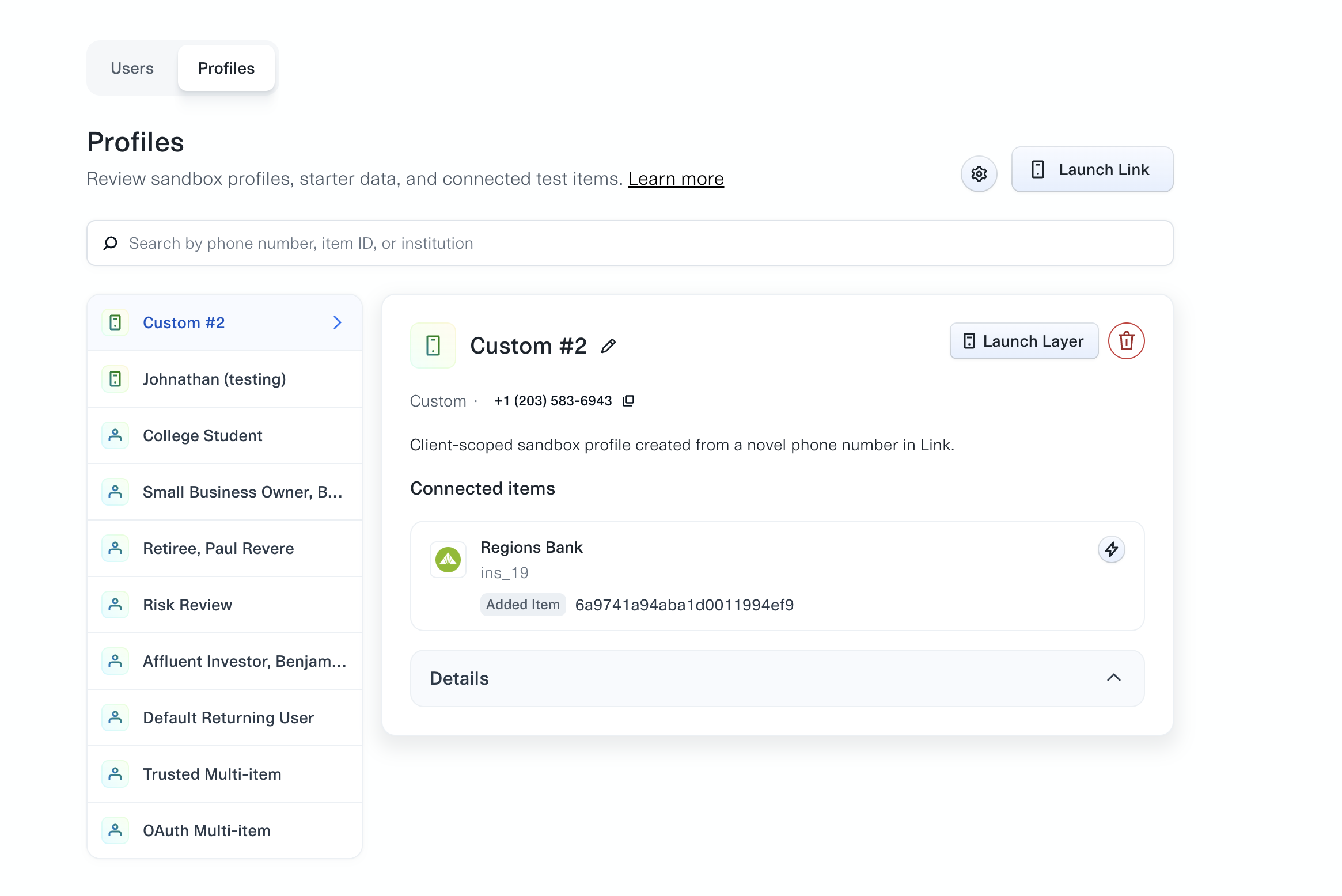
    Profiles are managed in the Profiles tab of Sandbox Studio.

    The Profiles tab of Sandbox Studio, listing custom and starter profiles down the left side and showing a selected custom profile with its phone number, its connected Item at Regions Bank, and controls to launch Link or Layer.

    Sandbox Profiles are scoped to your team. Two teams using the same phone number get two independent profiles that cannot see each other. In Production, a returning user's profile is global to Plaid. See Differences between Sandbox and Production.

    Using a profile

    1. In Sandbox Studio, open the Profiles tab and launch Link from the profile you want to use. You can also launch Link from your own integration and enter the profile's phone number when prompted.
    2. Enter the one-time passcode 123456. Every Sandbox profile uses this code.
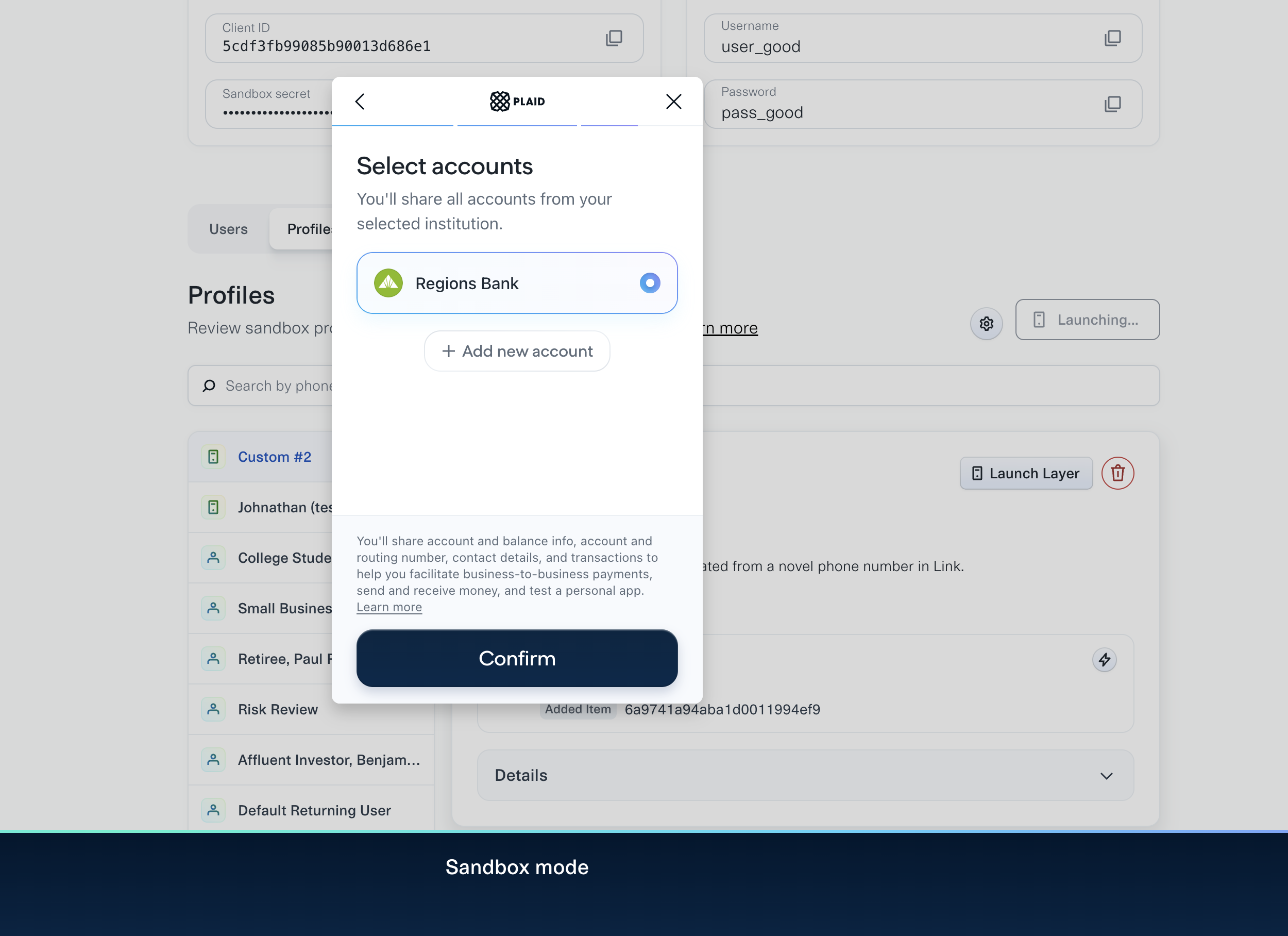
    3. Link shows the profile's saved accounts. Select existing accounts, or add a new institution.
    The Link account selection screen for a returning user, listing the institution already connected to the profile alongside an option to add a new account.

    Adding an institution attaches it to the profile, so it is present the next time that phone number is used. Items created this way behave like any other Sandbox Item and can be used with the API explorer or with your own API calls.

    Starter profiles

    Starter profiles are Plaid-defined profiles that begin with a set of connected accounts and realistic identity data. Sandbox Studio labels them Extendable: the starting shape is fixed, but you can connect more institutions to them, and reset them back to the starting shape at any time.

    Each starter profile is claimed by using its phone number in Link for the first time. Until then it exists only as a catalog entry.

    Phone numberProfileIdentityStarting institutionsProducts
    415-555-0131College StudentAlberta JohnsonTartan BankAuth, Transactions, Identity, Assets
    415-555-0132Small Business OwnerBetsy RossFirst Gingham Credit Union, Tartan BankAuth, Transactions, Identity, Assets
    415-555-0133RetireePaul RevereFirst Platypus Bank, First Gingham Credit UnionAuth, Transactions, Identity, Investments, Assets
    415-555-0134Risk ReviewJordan LeeTartan BankAuth, Transactions, Identity, Assets
    415-555-0135Affluent InvestorBenjamin FranklinFirst Platypus Bank, Tartan BankAuth, Transactions, Identity, Investments, Income, Assets
    415-555-0136Default Returning UserAlberta Bobbeth CharlesonTartan Bank, First Gingham Credit UnionAuth, Transactions, Identity
    415-555-0137Trusted Multi-itemNoneTattersall FCU, Tartan Bank, First Gingham Credit UnionAuth, Transactions, Identity
    415-555-0138OAuth Multi-itemNoneTattersall FCU, Tartan Bank, First Gingham Credit Union, Platypus OAuth BankAuth, Transactions, Identity

    415-555-0137 and 415-555-0138 exist to exercise the saved-account picker across several institutions, including an OAuth institution. Their accounts use default Sandbox data and carry no profile identity, which means they are not eligible for Layer; use one of the other starter profiles for Layer testing.

    415-555-0134 is shaped for risk and fraud review: low available cash, negative events, contact-data churn, and no trusted-device history.

    Custom profiles

    Any valid US phone number that is not reserved by a starter profile creates a custom profile the first time it is used in Link. A custom profile starts empty and holds whatever institutions you connect to it. Reusing the same phone number returns the same profile.

    Custom profiles are the right choice when you want a returning user built entirely from your own custom test data: connect a custom user through Link, and the resulting Item is attached to the profile.

    Resetting and deleting

    Starter profiles can be reset, which removes the Items connected to them and restores the starting shape the next time the phone number is used in Link. The phone number stays reserved.

    Custom profiles can be deleted, which removes the profile entirely. Using the phone number again creates a new, empty profile.

    Testing Layer

    Layer looks up a saved profile from the user's phone number, so a Sandbox Profile is what makes a Layer session return data. To test Layer:

    1. Create a Layer template in the Dashboard.
    2. Launch Layer with a starter or custom profile's phone number.
    3. Enter the OTP 123456.

    Layer evaluates eligibility in Sandbox the same way it does in Production: the profile must have connected accounts, resolvable identity, and attributes satisfying your Layer template. A profile that does not qualify returns an ineligible result rather than an error, which is the same behavior your integration will see in Production for a user Plaid does not recognize. Both outcomes are worth testing.

    415-555-0137 and 415-555-0138 are always ineligible, because their accounts carry no profile identity. Any phone number that has never been used in Link is also ineligible, since no profile exists for it.

    For testing profiles with deliberately incomplete identity data, and for Extended Autofill, see Testing Layer.

    Legacy Sandbox phone numbers

    Before Sandbox Profiles, returning user testing used a set of phone numbers seeded globally across all Plaid teams, beginning 415-555-0011. These numbers still work and are unchanged, but they are shared, cannot be reset, and cannot be extended with new institutions.

    415-555-0136, 415-555-0137, and 415-555-0138 reproduce the starting shape of 415-555-0011, 415-555-0012, and 415-555-0013 respectively, as profiles scoped to your team. New integrations should use the starter profiles above.

    Developer community
    GitHub
    GitHub
    Stack Overflow
    Stack Overflow
    YouTube
    YouTube
    Discord
    Discord